
Skylify App
To streamline social media content creation and management using AI power
Duration
12 weeks
Team
Eva Zhou Molly Nguyen
Tanya Polpak
My role
Wireframe design
MVP Prototype design
Usability test
Toolkit
Figma, Miro, Clickup
Project background
Kingdom Technology is a startup that offers AI-powered tools for digital solutions for businesses. They are developing an AI-power app, Skylify (“the App”), to help Naro influencers create and schedule posts on social media and grow followers fast.
As a growing AI-tech startup aiming to bring Skylify into the market, Kingdom Technology has completed the first round of UX research and has gathered a database of the potential clients of the App, created a proto-persona, identified a list of competitors and mapped out an initial user flow.
As a UX designer, my role is to support Kingdom Technology’s initiative to evaluate its customer experience, design an MVP prototype and conduct usability tests.
Objective overview
– To synthesise Kingdom Techonology’s UX research on Skylify
– To review the current user flow
– To create a new wireframe and a mid-fi prototype
– To run usability tests and gather findings and insights to guide the next step of the development of the app
Skylify’s targeted users are Naro Influencers, who typically manage between 1K-10K users in their social media accounts. As startups on social media platforms, they have limited time and financial resources in hand, and their priority is to streamline the creation process.


Finding the pain points
After studying and reviewing Skylify’s research on targeted users, I identified four major pain points that the App should be focusing on solving:
1. The potential clients require simplified functions from the Skylify app (“the App”) because they represent various levels of tech-savvy and knowledge of social media. Some other factors to be considered are different age and language groups, as some business owners are over 50; for others, English is the second language.
3. Because many users are not familiar with social media, they may not know the best methodology/strategy when creating content to achieve their business goals.
2. Time and efficiency are crucial for most users because of the nature of small business: one person often multitask in different roles. Therefore, the users hope that the system can streamline, batch produce and schedule. They also like to see result analysis in the same App.
4. Many users are aware that AI tools become available but are hesitant about the complexity and accuracy of AI tools. Some may consider AI “another tool” that they need to learn on top of social media.
Problem framing
How may we create a smart system that utilises AI power to streamline content copywriting and content management on social media to help Naro influencers grow?
Design Principles
– Simplicity: Generate content once and use it for multiple social media platforms.
– Universal design: The app serves users of all tech-savvy. It is to simplify the user experience of using social media, not to complicate it. Avoid social media jargon.
– Design Assessability: The app is designed for all age groups. Only use fonts and colours that are easy to read on screen.
– Mobil phone-focused design: the interface needs to cater for smartphones primarily; the Web app will be developed accordingly.
Key features of MVP

Unexpected twist and turn
Midway through the project, Kingdom Technology informed me that they would change the scope of the end users – from the original Naro influencers to general small business owners, as the company reviewed its client base and technology limitations.
This change means Skylify will serve a different group of customers. While general business owners may face similar challenges with Naro influencers, such as multitasking and time management, they may have different understandings, skill sets and approaches to using social media platforms. General business owners are also likely to be less niche and use less jargon on social media.
Ideally, we should start over with a round of user interviews. However, time was restricted and we had to move on to the next stage.
To help merge the potential gaps between the App’s functions and the new users, I conducted a series of desk research and studied the best practices from a few competitors in the market.
After that, I created a new user flow for the App.

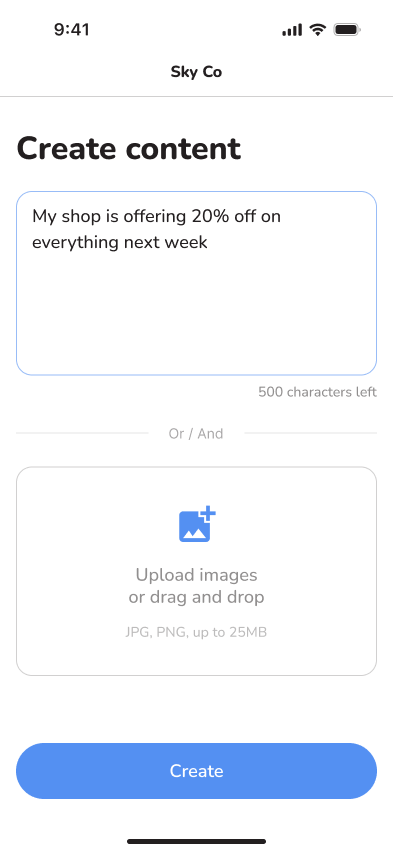
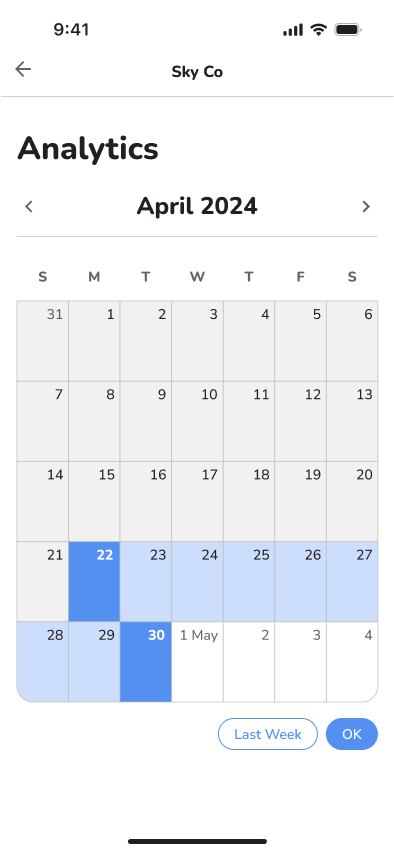
Mid-fi prototype and
Usability Test
I conducted four usability tests for the MVP. The users were selected from Skylify’s user pool.


The Insights
All users praised the Skylify App for its intuitiveness, finding it easy to navigate and generate social media content, regardless of their tech skills. Key features include tutorial videos, AI business analysis, various content creation methods, a sidebar menu, flexible editing options, and profile settings for business or personal use.
Some users are confused by certain terms used in the app and the functionality of various buttons. This confusion creates barriers for users and, in some cases, leads them to abandon their tasks, preventing them from fully utilising the app’s intended features.
Users suggest extended features such as generating multiple hashtags, generating content based on uploaded images, generating images based on topics and texts, and recommending schedule timings based on time zones and targeted customers’ activities. The suggested features reflect the users’ creative process.
Users also express diverse and unique needs to work on social media. These needs are currently not covered by Skylify and are beyond the App’s scope. Some examples are video uploading and editing, image editing, topic generating, blog writing, and Facebook Ads.
This may suggest an ambiguity in the definition of Skylify’s intended users. This may also indicate a mismatch between the intended users and the usability test group. Based on Skylify’s current features, some users suggest that the App may target niche small business owners who use limited functionalities, such as uploading images and simple text. This is because the App’s simplicity in its current features doesn’t involve a complex editing process.
“…say, photographers, salons, makeup artists…they don’t have to overthink the content they share…”
“If you are catering for Facebook and Instagram posts, the features that you have included are already enough…because on FB or IG, they only post a photo and then a caption.”
Considerations and Recommendations

Based on the insights from the usability test, the considerations and recommendations for the next step of Skylify’s UX design are:
1. Conduct thorough marketing research to refine and redefine the App’s niche users and focus on the specific needs of the user group to build features around those.
2. Some immediate improvements to add to the App are: generating hashtags and displaying explanations of buttons/functions upon hovering.
3. Depending on the technical capabilities, Skylify may include new features such as: generating images based on text content and vice versa, recommending the best schedule time considering the time zones and activities of the targeted customers. Connecting to multiple social media platforms and integrating analysis results from the platforms.
Final thoughts
Working with startups has its beauty and challenges. On the one hand, it provides the chance to work on cutting-edge projects at the forefront of innovation, and being part of a startup’s journey can be satisfying. On the other hand, time, human and financial resources are often limited. As a designer, you also deal with a lot of ambiguity, constant change and absence of structures.
I think it’s important for the team to keep timely and close communications throughout the whole design process – eg. between the project manager, the developers and the designers – to navigate the changes and challenges.